 If you have a class twitter account or your students have accounts to use for learning, you know that some students do not have access to the account at home. While some students can use text messages, it is cumbersome to participate in Twitter with a basic phone and SMS text (not too mention costly if you don't have unlimited texting). However, with the free resource Tweet Call, your students can dial in (1-877-TweetCall), speak their tweet and it instantly shows up on Twitter as a speech to text translation! This is a wonderful application for iReporting on the go with Twitter, posting brainstorming ideas, homework reflections, summarizing, as well as current events.
Showing posts with label twitter. Show all posts
Showing posts with label twitter. Show all posts
Tuesday, March 16, 2010
Tweet Call! For Students Without Internet at Home
If you have a class twitter account or your students have accounts to use for learning, you know that some students do not have access to the account at home. While some students can use text messages, it is cumbersome to participate in Twitter with a basic phone and SMS text (not too mention costly if you don't have unlimited texting). However, with the free resource Tweet Call, your students can dial in (1-877-TweetCall), speak their tweet and it instantly shows up on Twitter as a speech to text translation! This is a wonderful application for iReporting on the go with Twitter, posting brainstorming ideas, homework reflections, summarizing, as well as current events.

Sunday, August 30, 2009
Teachers Use Cell Phones to Tweet at Movies!
 In order to help students improve their writing skills (and thinking around writing & literacy), principle Kipp Rogers at Passages Middle School in Virginia decided to have his teachers do an activity with their cell phones at the movie theater! Yes! They were asked to turn on their cell phones and text message to twitter during the movie Julie & Julia.
Saturday, January 24, 2009
PixelPipe: Cross-Post Media to Multiple Places from One Text Message
 I enjoy being about to post pictures, videos, and text directly from my cell phone to public and private spaces on the Internet. What I love about this is the fact that students do not have to bring their cell phones into the classroom in order to collect and store data. A few of my favorite places to post cell phone media include Flickr, my Blogger Blog, Photobucket, my gmail, YouTube, Twitter, and Drop.io. While I normally have to send separate messages if I want to post one piece of media or text to all of these sites, using PixelPipe I can now send one message and have it post to many different places on the Internet. PixelPipe allows you to create a free account, where you receive a mobile address. You (the teacher) can give out the mobile address to all your students, while you maintain control of the settings and passwords in the account! Next you can set up your PixelPipe account to post to as many web resources as you would like (including email
 ). It is very easy to set up and get started. Everything sent to PixelPipe is automatically backed-up in the private PixelPipe account (along with times and links to the websites where the media was posted).
While playing with PixelPipe I immediately thought of iReporting and how students could document their local news reporting in multiple places (just as real reporters do). Not only is PixelPipe a great way to report the news, but also a free and easy way to back up data collections in multiple places.
Sunday, January 18, 2009
Students Become iReporters at Inauguration!
News organizations are eager for those perfect inauguration pictures and videos! There are many opportunities for students to snap a few pictures (or take some video) and possible get them published through a popular news organization. A great opportunity for students to take advantage of their cell phones and turn them into data collecting tools for journalism!
I just read a great post from Andy Carvin, about the students at Worcester Academy in Massachusetts who are documenting their inaugural experiences via their own cell phones. They have a mobile Flickr account, a YouTube account, a Twitter account and a blog where they are sending their pictures, videos, and text messages about their inaugural experiences. What could be more authentic social studies, data collection, and data analysis than this!!???
Here are a few places that inauguration student goers can send their media and participate as iReporters...
1) CBS News (CBS EyeMobile)
Send to: eye@cbseyemobile.com
2) CNN iReport
Send to: iReport@cnn.com
3) The New York Times
Send to: pix@nyt.com with your full name and the location where the picture was taken
4) PBS Newshour Speak Out Podcast for Student Reactions
Call in: to the Gabcast number and record your reaction to the Inauguration (call Lizzy Berryman, Director of the Teacher Center, at 703.998.2182 to get the Gabcast number and pin).
5) NPR Inauguration Report
Send Videos: Upload your video to your own YouTube account and tag it either inaug09 or dctrip09.
Send Pictures: Using your Flickr account, upload pictures and tag them inaug09 or dctrip09.
Send Text: Send a text message to 66937. Begin the message with the phrase #inaug09 or #dctrip09. You can include a ZIP code or one of the location tags
6) Photobucket Obama Album
Send Videos and Pictures to your Photobucket account. Then post to the collective album here.
Thursday, January 8, 2009
Mobile Phone Video Challenge...Film on the Fly
 Yesterday I ran across a twitter post by Hall Davidson about a very interesting mobile phone video challenge sponsored by a local PBS station in California called Film on the Fly. On February 7th, 2009 the contest will send out a text message challenge (story) to anyone who signs up and ask them to create a mobile video of the topic in 20 hours or less! I myself cannot wait to participate and SEE the results! Of course this contest has me thinking about how classroom teachers could do this with their own students.
Since many students do not have camcorders in their cell phones, they could give a video or still photo option for the challenge. For example I could see a social studies teacher texting out part of a famous speech (such as "I have a dream") and asking their students to take pictures/video of things in the community that represent the major arguments or points in the speech. Students could take pictures of children of all races/creeds playing together to represent the "dream fulfilled" and at the same time could take pictures of signs that say "restricted" to represent the "unfulfilled dream".
The free resources that teachers could use to make this happen would include...
Storage Sites for the Media
drop.io to store all the media students collect. Since drop.io is password protected and can take all types of media it is perfect for this type of assignment.
Text Message Blast to Students
Sites such as txtBlaster, Textmarks, or Sendible would be great for creating an easy text message "blast" out to cell phones of the assignment.
Audio Blast to Students
If the teacher was worried about using text messaging because of potential charges on student's phones (although many do have unlimited text messaging now), they could use an audio blast with resources such as Dial2do or AbbyMe.
Wednesday, November 5, 2008
Radio Show #4: Creating Prof Dev. for Teachers who are Interested in using Cell Phones in Learning
Link to Show
Chat Transcript from Show:
Liz Kolb:Welcome to Cell Phones in Learning, we will start in 5 minutes!
Liz Kolb:Today's topic: Creating Professional Development Scaffolds for Teachers who are interested in using student cell phones with school learning
Liz Kolb:http://pollingplaces.nytimes.com/
Liz Kolb:http://www.eschoolnews.com/news/top-news/?i=55665
Guest1207:my display name is now Guest1209
Liz Kolb:http://drop.io
Peggy_G:sorry I had computer issues and had to restart. Missed a bit! Great to be here!
Peggy_G:I love your suggestions for podcasts. Students love doing them!
Peggy_G:Funny that you say textmessaging is complex. :-) Kids seem so comfortable with it.
Peggy_G:I definitely agree with you about teachers/adults using text messaging. I've read some really "interesting" text messages from adult friends that seem to be all on the wrong keys. :-)
Peggy_G:Twitter is a good way to learn to write messages in 140 characters.
Liz Kolb:http://textnovel.com
Guest1238:my display name is now Guest1241
Peggy_G:I haven't heard of twittertories but that sounds fantastic!
Liz Kolb:http://www.sindhtoday.net/south-asia/32245.htm
Liz Kolb:http://Notifu.com
Peggy_G:found the link for twitterstories http://twitterstories.blogspot.com/
Peggy_G:fascinating that notifu is so interactive--not just sending messages one-way! Great!
Peggy_G:it's so helpful when you suggest out-of-classroom alternatives!
klmontgomery:Will you autograph it?
Peggy_G:I took your book to our Westside AzTEA meeting on Monday and shared it with everyone. We're all excited about it!
Peggy_G:Do you have a wikispace or blog space for sharing feedback on the book?
klmontgomery:Great.
Liz Kolb:No, but that is a great idea! I'll set one up
Peggy_G:Will definitely be back in 2 weeks! :-) Love your show!
Liz Kolb:Thanks Peggy
Peggy_G:Send a tweet for your feedback space and I'll contribute.
Liz Kolb:Will Do!
Next LIVE Show: Wed. Nov. 19th at 3:00pm (eastern standard time). Topic: Creating student projects using text messaging.
Wednesday, October 29, 2008
Survey Results: Favorite Cell to Web or Web to Cell tool!
I asked my educator friends on twitter to share their favorite cell to web or web to cell application. I want to thank everyone who replied. There were some of the expected outcomes such as Google sms or Flickr Mobile, but I was surprised at how many more obscure sites were referenced. A few of those that stand out are Loopt, Evernote, and Mofuse. Below are the ranked results.
#1) Flickr Mobile
#2) Polleverywhere
#3) Twitter
#4) Google sms, Dial2do, Netvibes, Mofuse, Jott, Qik, Pingfm, mobile gmail, mobile myvocal, Evernote, Loopt, OperaMini, Utterli (formerly Utterz).
tomgrissom @lkolb polleverywhere and dial2do
zecool @lkolb Web to mobile/cell: Mofuse. It makes my blog (Blogger) easily readible from cell. Can add comments, switch to standard view, etc.
KevinByers @lkolb Mine polleverywhere.com. Now if I could only get cell phones unbanned. I'm working on it!
paulrwood @lkolb my students use their phones for Google sms and polleverywhere in my classes.
drezac @lkolb twitter and jott
zemote @lkolb evernote is my favorite, followed by qik
dougsymington @lkolb Flickr may be best mobile web, tho pingfm and netvibes good too. Twitterberry one I use a lot on BB
mguhlin @lkolb Fav tool--email images/video to Flickr. You can't beat that when doing a workshop. "You're on the Web NOW." Response:"Wow
patsko @lkolb m.gmail.com and m.myvocal.com
tonitones @lkolb OperaMini closely followed by utterli or qipit
klmontgomery @lkolb Twitter Poll - My favorites are Mobile Fotos (Flickr) and JustUpdate (Twitter) for iPhone.
bjmcdonald @lkolb gotta be Flickr
ucdjoe As much as I might sound like a high school student, my favorite is the Facebook app, followed by Twitterific and Loopt.
Vote for your favorite! Feel free to add a comment if your favoite is not an option.
#1) Flickr Mobile
#2) Polleverywhere
#3) Twitter
#4) Google sms, Dial2do, Netvibes, Mofuse, Jott, Qik, Pingfm, mobile gmail, mobile myvocal, Evernote, Loopt, OperaMini, Utterli (formerly Utterz).
tomgrissom @lkolb polleverywhere and dial2do
zecool @lkolb Web to mobile/cell: Mofuse. It makes my blog (Blogger) easily readible from cell. Can add comments, switch to standard view, etc.
KevinByers @lkolb Mine polleverywhere.com. Now if I could only get cell phones unbanned. I'm working on it!
paulrwood @lkolb my students use their phones for Google sms and polleverywhere in my classes.
drezac @lkolb twitter and jott
zemote @lkolb evernote is my favorite, followed by qik
dougsymington @lkolb Flickr may be best mobile web, tho pingfm and netvibes good too. Twitterberry one I use a lot on BB
mguhlin @lkolb Fav tool--email images/video to Flickr. You can't beat that when doing a workshop.
tonitones @lkolb OperaMini closely followed by utterli or qipit
klmontgomery @lkolb Twitter Poll - My favorites are Mobile Fotos (Flickr) and JustUpdate (Twitter) for iPhone.
bjmcdonald @lkolb gotta be Flickr
ucdjoe As much as I might sound like a high school student, my favorite is the Facebook app, followed by Twitterific and Loopt.
Vote for your favorite! Feel free to add a comment if your favoite is not an option.
Thursday, February 7, 2008
Location Blogging for Free without Software!
 Finally! After much research I have found a great and free web2.0 application that couples with cell phones for location blogging. It is called Flagr. Flagr allows anyone to create an account. And Flagr works with just about any basic cell phone (no smartphones needed), and no need to download software! In Flagr you can participate in the large global community Flagr map (similar to the Twitter public timeline) OR you can create your own maps. You can make your maps public, semi-private (guests need an invitation to post to the map), or private (you are the only one that can post to the map). Once you create an account, you just click on Create a New Map. Name the map and give it a subject (such as "my spring break travels" or "local biological organisms"). Then hit Save and you will immediately see the map and a mobile Flagr email where you can send your text messages or cameraphone pictures!
For example if you wanted to ask students to document local historical landmarks in their everyday experiences to the map above, they can take a picture with their cell phones of the historical artifact and immediately send it (m02pe@flagr.com) to the class Flagr map, along with a text message of the location and any other information to describe the item. So it would look like this on your cell phone...
Send to: m02pe@flagr.com
Message: Ann Arbor, MI. house of original residents
Now it will post a new "flag" on Ann Arbor with the message and or picture. Over the course of the entire school year, the class could have a large collection of finds!
Here are the Steps:
1) Login to Flagr.com and create a new account, by clicking on Sign Up.
2) Click on Create A New Map in your account.

3)
 Select the type of map you want to create (Public, Semi-Private, or Private)
4) Give your map a topic, name, web location, and icon

5) Now your map is ready for posting. It will automatically generate a mobile address for your map! Flag away!

Another example could be student mobile journalism, where students report on current news events happening locally or globally. Another feature of Flagr is that you don't actually have to be at the physical location in order to post from your cell to the map. For example, if I wanted to text message about a current event happening in Tennessee such as the Tornadoes, I could text the message from my house in Ann Arbor, MI, but when I send it, I could identify Nashville, Tenn as the location so it will post a "flag" in Nashville on our class map. It really forces students to know and understand geography!
Wednesday, January 16, 2008
Create Cell Phone "I search" video papers with Twiddeo
 I was listening toEd Talk (01_14) recently and they (John, Jennifer, Dave, and Jeff) spoke about a new resource called Twiddeo, which is just Twitter with video. It was an interesting discussion about whether Twiddeo should replace Twitter, but it got me thinking about educational learning uses of this new resource. So I decided to try it out. And the result....so easy! And fun! You can post videos from your computer, but you can also post immediately from your cell phone to your personal account. This allows for many "out-of-school" learning assignments with cell phones and video. And since I was playing with Twiddeo, I though I better get more involved with Twitter so I put up my twitter information and have vowed to Tweet from time to time!
The first idea that came to my head was conducting an "I search" video paper. I know when I taught high school writing "I search" papers was very popular. Why not take it to a new level and have students conduct an "I search" Twiddeo, where they would document their "search" or research on a topic. This could be done for a language arts, social studies, or science class. In language arts the students could search for local authors and the places that inspired their work. In social studies, students could search for local history projects (such as local landmarks that played a role in the Civil War). Another example would be in a physical science class, students could do a video "I search" on citizens who are going "green" and how they are helping to prevent global warming. The great thing about using Twiddeo for conducting research or "I search" is that the focus becomes the process and not the product. The focus is how to conduct the research and students learn to use their cell phone as a way to collect data and document research. Of course students would need to get verbal permissions to post any person in their video.
Another project idea that came to mind was that since Twiddeo is social networking where you can view multiple videos and responses on your feed, students in foreign language classrooms could have video exchanges with students in other countries very easily. Each student could document different aspects of their culture (such as clothing, holidays...etc) and compare them instantly on Twiddeo. Since Twiddeo is more personal (as mentioned in the Ed Talk podcast), this would allow people in difficult cultures to make more personal connections.
Monday, December 17, 2007
Mobile Citizen Activism...How about student activism?
There has been some discussion in the local papers about mobile citizen journalism, where everyday people capture breaking news stories with their cell phones. While I think that students can definitely participate in their own citizen journalism around their community, I also think mobile phones provide a wonderful opportunity for student activism. One example of an activist movement is Friends of the Earth. Friends of the Earth ask citizens to video tape (they can use their mobile camcorders) a message about saving the environment in their local community. Students could not only participate in projects like this but they could also help to create mobile activist projects. They could use some of the free web2.0 mobile resources such as Eyespot (which can immediately post to any blog) and ask people to post mobile videos on different activist or social justice topics such as reasons why we should donate to a local homeless shelter or supporting universal health care reform. Another resource that I think might be helpful for activism is text messaging. Joe Wood, he has brought my attention to a new idea of using Twitter (a social networking text messaging tool) as a mobile learning tool. One idea that I thought of was to use Twitter as a tool for social activism. Some of the 2008 presidential candidates have a Twitter account, so citizens can follow their campaigns. One example is Barack Obama. 
Students could create their own activist campaign on Twitter. For example, they could send out text alerts and messages about environmental issues, where others who are interested in the same topic could become part of their activist community. They could focus efforts on educating the public about their topic of interest. Another activism project is the People's 311, where New Yorkers can post mobile pictures of dangerous situations in New York City on a local map (such as a stop sign that has fallen down).

Students or teachers could do something similar in their own local community with mobile Flickr and posting to a private Flickr Map (under the You Tab--My Map at the top of any Flicker account). Teachers could create a community account in Flickr and give out to students the mobile image posting address.
Students could create their own activist campaign on Twitter. For example, they could send out text alerts and messages about environmental issues, where others who are interested in the same topic could become part of their activist community. They could focus efforts on educating the public about their topic of interest. Another activism project is the People's 311, where New Yorkers can post mobile pictures of dangerous situations in New York City on a local map (such as a stop sign that has fallen down).

Students or teachers could do something similar in their own local community with mobile Flickr and posting to a private Flickr Map (under the You Tab--My Map at the top of any Flicker account). Teachers could create a community account in Flickr and give out to students the mobile image posting address.
Thursday, December 6, 2007
Create Speech to Text blogs/Calendars from your cell with Jott!
Jott is fast becoming one of my favorite organizational tools for cell phones!
I think there are strong connections for student and teacher organization as well. Jott has created this new feature called "Jott Links" where you can send a speech to text message to a lot of popular 3rd party applications such as Twitter, or Livejournal. Thus if I want to add an event to my Google calendar I can simply use my cell phone, go to my Jott contact number
and call in the event. It will then put a text of the audio file on my google calendar.
It will do the same for a new blog post in Blogger or Livejournal! Where Gabcast creates
an MP3 podcast on my blog, Jott creates a new text post!
I created a sample message in the post above (it was very simple and only
took a few minutes to set up). The only negative that I have to say is that you can only do
"shorter" messages, but the transcription is really well done. This is how it works...
1) Create a free account in Jott
2) Click on Jott Links
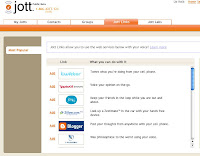
3) Select the 3rd party application you want to Jott to (for this tutorial I will select Blogger)
4) It will ask for your Blog ID. You can get this by going to your blogger acount and clicking on settings.

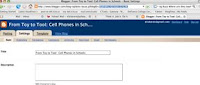
5) Copy the ID in the URL of your blog (highligheted above in blue), paste it into the Blog ID in Jott (below). Give a Jott name that you will remember when you call in to Jott (such as "blogger")
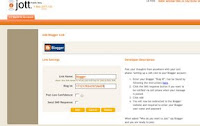
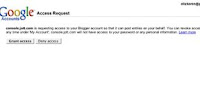
6) Grant access to your blog
7) Back in Jott you should now have a link on the right-hand side that states your "Jott links" as Blogger (below).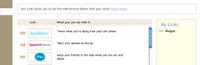
8) Now you are ready to create a Jott speech to text blog post. Call in to Jott 1-866-jott-123 (put it in your cell phone contact list so you have it when you need it). When they ask you "who do you want to Jott?" say "blogger" (or the Jott Name that you used). Speak your message and when you are done hit the pound sign. Within an hour, your Jott should be posted on your blog!
I think there are strong connections for student and teacher organization as well. Jott has created this new feature called "Jott Links" where you can send a speech to text message to a lot of popular 3rd party applications such as Twitter, or Livejournal. Thus if I want to add an event to my Google calendar I can simply use my cell phone, go to my Jott contact number
and call in the event. It will then put a text of the audio file on my google calendar.
It will do the same for a new blog post in Blogger or Livejournal! Where Gabcast creates
an MP3 podcast on my blog, Jott creates a new text post!
I created a sample message in the post above (it was very simple and only
took a few minutes to set up). The only negative that I have to say is that you can only do
"shorter" messages, but the transcription is really well done. This is how it works...
1) Create a free account in Jott
2) Click on Jott Links

3) Select the 3rd party application you want to Jott to (for this tutorial I will select Blogger)
4) It will ask for your Blog ID. You can get this by going to your blogger acount and clicking on settings.


5) Copy the ID in the URL of your blog (highligheted above in blue), paste it into the Blog ID in Jott (below). Give a Jott name that you will remember when you call in to Jott (such as "blogger")

6) Grant access to your blog

7) Back in Jott you should now have a link on the right-hand side that states your "Jott links" as Blogger (below).

8) Now you are ready to create a Jott speech to text blog post. Call in to Jott 1-866-jott-123 (put it in your cell phone contact list so you have it when you need it). When they ask you "who do you want to Jott?" say "blogger" (or the Jott Name that you used). Speak your message and when you are done hit the pound sign. Within an hour, your Jott should be posted on your blog!
Subscribe to:
Posts (Atom)
 Cell Phones in Learning by Liz Kolb is licensed under a Creative Commons Attribution 3.0 United States License.
Based on a work at cellphoneseinlearning.com.
Permissions beyond the scope of this license may be available at http://cellphonesinlearning.com.
Cell Phones in Learning by Liz Kolb is licensed under a Creative Commons Attribution 3.0 United States License.
Based on a work at cellphoneseinlearning.com.
Permissions beyond the scope of this license may be available at http://cellphonesinlearning.com.